

How to Install a Ceiling Fan: Step-by-Step DIY Guide (9 Steps)
20th June 2024 | Written By: Rika Ash | Read Time: 3min | Last Updated: 05th October 2026
Today, ceiling fans are not just cooling devices; they have become essential appliances in most households, particularly in warmer regions. With a wide range of attractive ceiling fans available in the market, they are now also used to enhance a home’s appearance. When someone installs a ceiling fan, it’s crucial to follow these 9 steps to ensure it is correctly installed.
Safety Precautions Before Installing a Ceiling Fan
Before installing a ceiling fan, switch off the main power supply to the installation point to avoid the risk of electric shock. Check that the ceiling and mounting point are strong enough to support the fan securely, and inspect the wiring for any visible damage or loose connections. Use the correct mounting hardware and ensure all components are properly tightened before operation. Installation should be carried out according to the manufacturer’s instructions, and if you are unsure about the electrical connections or mounting process, it is advisable to seek assistance from a qualified electrician.
Ideal Ceiling Fan Height & Clearance Guide
For proper airflow and safe operation, a ceiling fan should be installed at an appropriate height with sufficient clearance from the floor, ceiling and surrounding objects. Ideally, the fan blades should be positioned at least 7 feet (around 2.1 metres) above the floor, while a height of about 8–9 feet is generally considered comfortable for effective air circulation. There should also be adequate space between the blades and the ceiling, as well as sufficient clearance from walls, lights and other fixtures to allow the fan to rotate freely. For rooms with high ceilings, a suitable downrod can be used to bring the fan to an effective operating height. Always follow the manufacturer’s recommended installation dimensions for the specific fan model.
Tools and Materials Needed
Following is the checklist for tools and materials before beginning the installation:
- Ceiling fan kit
- Screwdrivers (both flat-head and Phillips)
- Pliers
- Wire cutters/strippers
- Voltage tester
- Ladder
- Electrical tape
- Mounting bracket
- Wire nuts
- Safety glasses
The tools mentioned above will assist in safely installing a ceiling fan.
How to Install a Ceiling Fan: Step-by-Step Process
Here’s a guide to help for installing a new ceiling fan. Be sure to follow the manufacturer’s installation and safety instructions, comply with relevant building and electrical codes, and determine if a permit is needed. It’s better to know about the connections or wiring of the home before going ahead with the installation.
-
Step 1: Turn Off the Power at the MCB:
Safety first! Before starting any electrical work, make sure to turn off the power at the circuit breaker. Use a voltage tester to ensure that the power is off at the fixture.
-
Step 2: Check the Ceiling Hook or Fan Box:
Before mounting the fan, inspect the ceiling hook or fan box to ensure it is securely fixed and capable of supporting the fan’s weight during operation. Check for any signs of looseness, damage, corrosion or wear, and make sure the mounting point is firmly attached to the ceiling structure. Do not install the fan on a weak or unstable support. If there is any doubt about the strength or condition of the mounting point, have it inspected or reinforced by a qualified electrician or technician before proceeding.
-
Step 3: Install the Mounting Bracket:
Position the mounting bracket securely at the ceiling hook or fan box and fasten it using the recommended screws or mounting hardware. Make sure the bracket is level, firmly fixed and does not move or wobble. All screws and connections should be tightened properly before attaching the fan assembly. Always follow the manufacturer’s installation instructions and use only compatible mounting components.
-
Step 4: Assemble the Fan:
Assemble the fan according to the manufacturer’s instructions. This typically involves attaching the blades to the motor housing and preparing the downrod (if applicable). Some fans come with a downrod, which helps lower the fan to the desired height. If the ceiling is particularly high, you may need a longer downrod.
-
Step 5: Connect the Wires (Live, Neutral & Earth):
This step involves connecting the fan’s wiring to home’s electrical wiring. Typically, the wires are color-coded:
- Black (or red) wire: live or hot wire
- White wire: neutral wire
- Green or bare wire: ground wire
Connect the corresponding wires from the fan to the wires in the electrical box using wire nuts. Twist the wire nuts tightly and secure them with electrical tape for added safety.
-
Step 6: Hang the Fan on the Hook/Bracket:
Once the wiring is complete, lift the fan motor assembly and attach it to the mounting bracket. This step may require an extra pair of hands, especially if the fan is heavy. Secure the fan to the bracket using the screws provided.
-
Step 7: Attach the Blades:
If the blades are not yet attached to the motor housing, do so now. Most blades are attached with screws, so ensure they are securely fastened. Make sure the blades are evenly spaced and level to avoid wobbling when the fan is in operation.
-
Step 8: Fix the Canopy and Light Kit (If Applicable):
Secure the canopy over the mounting bracket to cover the wiring and fittings. If the fan includes a light kit, attach it as per the manufacturer’s instructions and ensure all connections and fittings are properly secured.
-
Step 9: Turn the Power Back On:
With everything securely in place, turn the power back on at the circuit breaker. Test the fan and light (if applicable) to ensure they are working correctly. Check for any unusual noises or wobbling, and make adjustments if necessary.
Your ceiling fan is now installed and ready to use. Not only will it help keep your room cool, but it also enhances your home’s aesthetic. For safety, consider having the installation done by a licensed electrician.
Ceiling Fan Wiring Diagram with Capacitor and Regulator
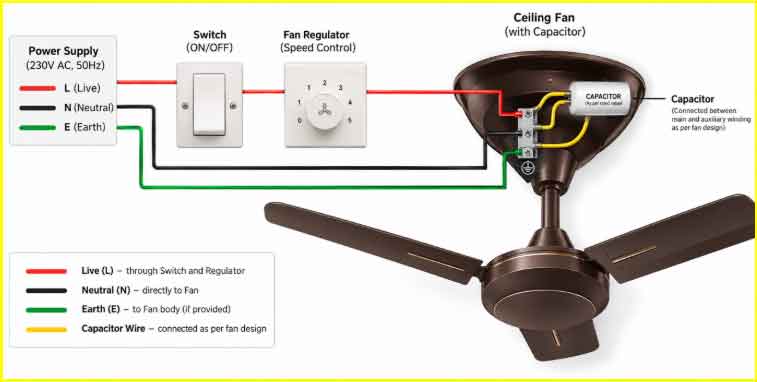
In a conventional ceiling fan, the live wire connects through the switch and regulator, while the neutral wire connects directly to the fan. The capacitor helps start and run the motor, and the earth wire, where required, should be connected to the designated earthing terminal. Always follow the manufacturer’s wiring diagram and use a qualified electrician.
Note: Earthing is not required for every household ceiling fan, particularly models designed with double insulation or without an earthing provision. However, metal-bodied or industrial fans may require proper earthing for safety, so always follow the manufacturer’s instructions.
How to Install a Ceiling Fan on a False Ceiling
A ceiling fan should never be mounted directly onto a false ceiling, as materials such as gypsum board may not be strong enough to support its weight and movement. The fan must be fixed to a secure structural support above the false ceiling, such as the concrete slab or a properly installed metal support frame. A suitable downrod can then be extended through the false ceiling, with the canopy covering the opening for a neat finish. Ensure there is adequate clearance around the fan and that all wiring and mounting components are securely installed. For safety, installation should be carried out by a qualified electrician or technician.
How to Install a BLDC Ceiling Fan with Remote
To install a BLDC ceiling fan, first switch off the main power supply and securely mount the fan to the ceiling hook or fan box. Assemble the downrod, motor and blades as per the manufacturer’s instructions, then connect the live, neutral and earth wires to the fan’s receiver or control unit, where applicable. Place the receiver safely inside the canopy without pinching the wires, secure the canopy, and ensure all fittings are tight. Once installation is complete, restore power and pair or operate the remote according to the product instructions. For safety, electrical installation should be carried out by a qualified electrician.
How to Balance a Ceiling Fan After Installation
If the fan wobbles after installation, first switch off the power and check that the blades, screws and mounting components are securely tightened. Make sure all blades are properly aligned and positioned at the same height. If the wobbling continues, a balancing kit can be used to identify and correct an uneven blade. Always follow the manufacturer’s instructions, and seek professional assistance if the issue persists.
Common Ceiling Fan Installation Mistakes to Avoid
-
Improper Wiring
Incorrect or loose wiring connections can lead to short circuits, sparking, or complete fan malfunction. Using wrong wire connections or failing to secure them properly may also pose serious safety hazards, including risk of electrical shock or fire. Always ensure proper wiring as per installation guidelines for safe and reliable operation.
-
Safety Precautions During Installation
Always switch off the main power supply before starting installation to avoid electrical hazards. Use proper tools and ensure all wiring connections are secure and correctly insulated. Verify that the ceiling and mounting box can support the fan’s weight, and tighten all screws and brackets firmly. Avoid installing in damp or wet areas, and follow manufacturer guidelines for safe and reliable operation.
-
Handling Electrical Components Safely
Handle all electrical components with care and ensure the power supply is switched off before beginning any work. Use insulated tools and avoid touching exposed wires or terminals. Ensure all connections are properly secured and insulated to prevent short circuits or electric shocks. Do not use damaged wires or components, and always follow recommended safety guidelines for safe handling and installation.
When Should You Call a Professional Electrician?
Call a professional electrician if you are unsure about wiring connections or lack proper tools and expertise. Professional assistance is essential when dealing with complex wiring, frequent tripping, sparking, or damaged electrical components. If the ceiling support or electrical box is not sturdy enough, or if the fan continues to wobble or malfunction after installation, it’s best to seek expert help to ensure safety and proper functioning.
Explore Goldmedal Ceiling Fans
Designed to combine efficient airflow, reliable performance and contemporary styling for different rooms and interiors, Goldmedal ceiling fans offer a range of designs, finishes and features to find a ceiling fan that suits your space and cooling needs.
-
Opus Prime BLDC:
The Goldmedal Opus Prime BLDC Ceiling Fan combines energy-efficient performance with modern convenience. Powered by a 30W BLDC motor, it delivers up to 350 RPM while consuming significantly less power than conventional fans. It comes with a smart IR remote for speed control, timer, sleep and boost modes, along with silent operation, consistent performance at low voltage and wide blades for effective airflow. The fan also features LED lights and an anti-dust finish for added convenience and easy maintenance.
-
Spacio BLDC:
The Spacio BLDC Ceiling Fan combines modern design with energy-efficient BLDC technology for silent performance and longer inverter backup. It features a smart remote with timer and sleep modes, six-speed LED indicators, and wide air distribution for convenient everyday comfort. Its refined form and contemporary styling make it a seamless fit for modern interiors.
-
Hush Flo BLDC:
The Hush Flo BLDC Ceiling Fan combines powerful airflow with energy-efficient performance, delivering up to 300 RPM and 230 CMM air delivery while consuming just 36W. It features silent operation, consistent performance at low voltage, a smart IR remote with speed, timer, sleep and boost modes, and six LED indicators for speed levels. Its wide blades, anti-dust finish and robust motor with high-grade copper and double ball bearing support reliable everyday comfort.
-
Oryzo BLDC:
The Goldmedal Oryzo BLDC Ceiling Fan is a true masterpiece that combines cutting-edge technology, superior performance, and stylish design. Powered by advanced BLDC (Brushless Direct Current) motor technology, this fan delivers powerful air flow while consuming up to 65% less energy compared to conventional ceiling fans, helping you save more on your electricity bills.
-
Senora:
The Senora Decorative Ceiling Fan combines elegant styling with powerful performance, delivering up to 380 RPM while consuming 52W of power. Its aerodynamic blades provide strong air delivery with low air turbulence and wind noise, while the high-grade copper motor supports smooth, reliable operation. Fluid-shaped trimmings, an anti-dust finish and a long-lasting coat give the fan a refined look suited to modern interiors.
-
Phantom:
The Phantom Ceiling Fan combines striking aesthetics with efficient performance, delivering up to 330 RPM while consuming 40W of power. Its bold six-blade design is complemented by a 3-colour LED light with remote control, adding both style and convenience.

Frequently Asked Questions (FAQs) :
-
Q1. What is the correct height to install a ceiling fan?
A ceiling fan should ideally be installed so that the blades are about 8–9 feet above the floor, with at least 7 feet of clearance for safe operation.
-
Q2. Which direction should a ceiling fan rotate after installation?
For cooling, a ceiling fan should generally rotate anti-clockwise (counter-clockwise) when viewed from below, so it pushes air downward. Some reversible fans may use clockwise rotation in cooler weather to help circulate warm air.
-
Q3. Can I install a ceiling fan without a regulator?
Yes, a ceiling fan can be installed without a conventional regulator if it has an in-built electronic speed control or remote-based control, as many BLDC fans do. For standard fans, a compatible regulator is generally required to adjust the speed.
-
Q4. How much does ceiling fan installation cost in India?
Ceiling fan installation in India typically costs around ₹300–₹800 per fan for a straightforward installation. The price can be higher if new wiring, a ceiling hook, false-ceiling reinforcement or additional electrical work is required.